

Could Someone Understand Compliance Six Months After It's Written?
 A compliance file should not feel like an archaeological dig conducted by someone with a deadline and a worsening eye twitch. Yet many do. There is an identity document in one folder, a screening result hidden in an email attachment, a signed notice named “final_FINAL_reallyfinal.pdf”, and a client declaration resting somewhere between Downloads and oblivion. Everything may technically exist, but that is not the same as being usable.
The simple test is this: imagine a colleague opening the file six months from now with no background knowledge of the matter. Could they identify the client, see what checks were completed, understand any risks raised, and locate the signed documents without sending a frantic message to three people? If the answer is “probably, after a cup of tea and an hour of rummaging,” the system needs attention.
Start With a File That Tells a Story
A well-organised file should follow the natural sequence of the client relationship. It should show what was requested, what the client supplied, what the firm checked, what was decided, and what was signed. Think of it as a short factual account rather than a storage cupboard with a login.Begin with a clear matter title and a consistent naming convention. Include the client name, matter reference and document type where appropriate. Dates should use a format that sorts properly, such as year, month and day. That tiny discipline stops a folder becoming a jumble of “ID new”, “ID newer” and “ID use this one instead”.
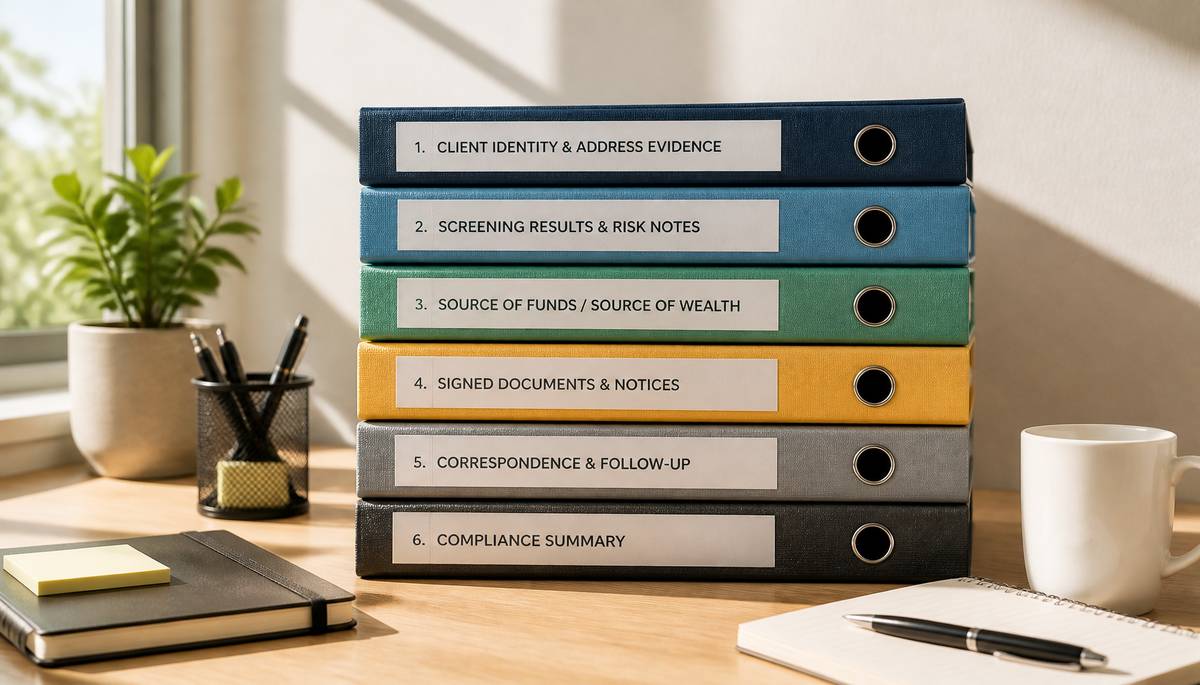
A practical folder structure might include:
- Client identity and address evidence
- Screening results and risk notes
- Source-of-funds or source-of-wealth declarations
- Signed engagement, costs and consent documents
- Correspondence and follow-up records
- Final compliance summary
Keep Evidence Separate From Interpretation
Identity documents, address evidence and client declarations are the raw materials. Screening results, internal notes and risk decisions are the interpretation. Both matter, but mixing them together makes it difficult to see what the firm knew at a particular point and how it reached its judgement.Store the original evidence in its own section, with the date received clearly recorded. Keep any internal assessment alongside it, but label it as an assessment. If a screening result produced a possible match, record what was reviewed, who reviewed it and why it was cleared or escalated. A future reader should not have to infer the logic from a cryptic note saying “looks fine, I think”.
This is especially important where information changes. A renewed passport, a new address or an updated declaration should not quietly replace the earlier version without explanation. Retain the old record where policy requires it, mark the newer item clearly, and add a brief note explaining what changed. The file should show progression, not perform a disappearing act.
Build a One-Page Compliance Summary
The most useful item in the folder is often the shortest: a concise summary prepared when the checks are complete. It should state who the client is, what verification was obtained, when screening took place, whether any issues were identified, which declarations were completed, and where the signed notices can be found.Make the Timeline Obvious
A compliance file is stronger when its timeline is visible at a glance. Record the invitation date, the date documents were received, the date screening was performed, the date any questions were resolved, and the date relevant notices were signed. This is not needless admin for its own sake. It shows that checks happened at the appropriate stage, rather than appearing mysteriously after the matter had already gathered speed.A short activity log can do much of this work. It need not become a diary of every mouse click. A handful of meaningful entries is enough:
- Identity and address documents received and reviewed
- Screening completed, with outcome recorded
- Additional information requested and supplied
- Risk assessment completed or approved
- Required notices issued and signed
Use Links, Not Treasure Maps
Where systems allow it, link related records directly from the compliance summary. A link to the screening report, signed notice or declaration saves time and reduces the risk of someone relying on the wrong version. If links are not available, use precise file names and folder locations.Avoid creating duplicate copies in several places unless there is a genuine operational reason. Duplication feels reassuring until one copy is updated, another is not, and the file begins arguing with itself. One authoritative record, clearly labelled and easy to locate, is usually safer than four competing cousins.
File It Like You Mean It
The final folder test is not whether the file looks busy. It is whether it explains itself. A colleague should be able to open it months later and answer the essential questions quickly: who was checked, what was supplied, what was found, what decisions were made, and what was signed.That clarity protects the client, the firm and the person who must later review the matter. It also turns a routine compliance task from a scatter of attachments into a reliable record of professional judgement. When the file can speak plainly for itself, nobody has to play detective—and the magnifying glass can remain safely in the drawer.
Article kindly provided by idli.ie
Latest Articles
- Why a Plumbing Company's Google Reviews Matter More Than Its Advertising Budget in 2026
- Why Business Parks Should Think Twice Before Removing Their Mature Trees
- Why the Quietest Toilet in the Building Could Be Wasting the Most Water
- Could Someone Understand Compliance Six Months After It's Written?
- How Much CNC Capacity Is Hidden in Setup Time?
- How to Test a New Freelancer Without Handing Over Your Whole Project
- From CAD File to Finished Component: How Procurement Teams Can Avoid Custom-Part Delays
- The Repair-or-Replace Calculation: When an Older Computer Is Still Worth Saving
- Why Commercial Roof Problems Often Start as Access Problems
- The Cybersecurity Weakness Most Businesses Overlook
- Waste Audits for Small Businesses: The Simple Exercise That Can Cut Costs
- Why Fitness Goals Fail at Work but Succeed at Home
- The Hidden Cost of Guessing What Your Competitors Are Doing
- Why the Best Commercial Sites Are Designed Around Traffic Flow Before Appearance
- Designing Offices That Still Work Five Years From Now
- Why the Most Successful Commercial Landscapes Prioritise Function Before Appearance
- How Businesses Can Stay Operational During Major Refurbishment Works
- Near Misses: The Most Valuable Workplace Incidents You're Probably Ignoring
- Choosing the Right Lifting Method Before Choosing the Equipment
- Why Visitors Ignore Half Your Homepage Within Three Seconds
- Sales and Marketing
- Human Resources
- Finance and Accounting
- Business Consulting
- Information Technology
- Supply Chain Management
- Manufacturing and Production
- Logistics and Transportation
- Risk Management
- Project Management
- Market Research
- Business Intelligence
- Customer Relationship Management
- Product Development
- Quality Assurance
- Outsourcing Services
- Procurement and Vendor Management
- Legal and Compliance
- Business Strategy
- Operations Management
- Leadership and Management
- Data Analytics
- Innovation and R&D
- Training and Development
- Ecommerce Solutions
- Public Relations
- Advertising and Promotion
- Branding and Identity
- Business Networking
- Event Management
- Office Environment